Indoor Route Optimization with Mappedin SDK
Indoor route optimization is a solved problem that most retailers ignore. A picker walking inefficient routes through a warehouse or store burns time and money on every order. Mappedin’s SDK provides the tools to fix this.
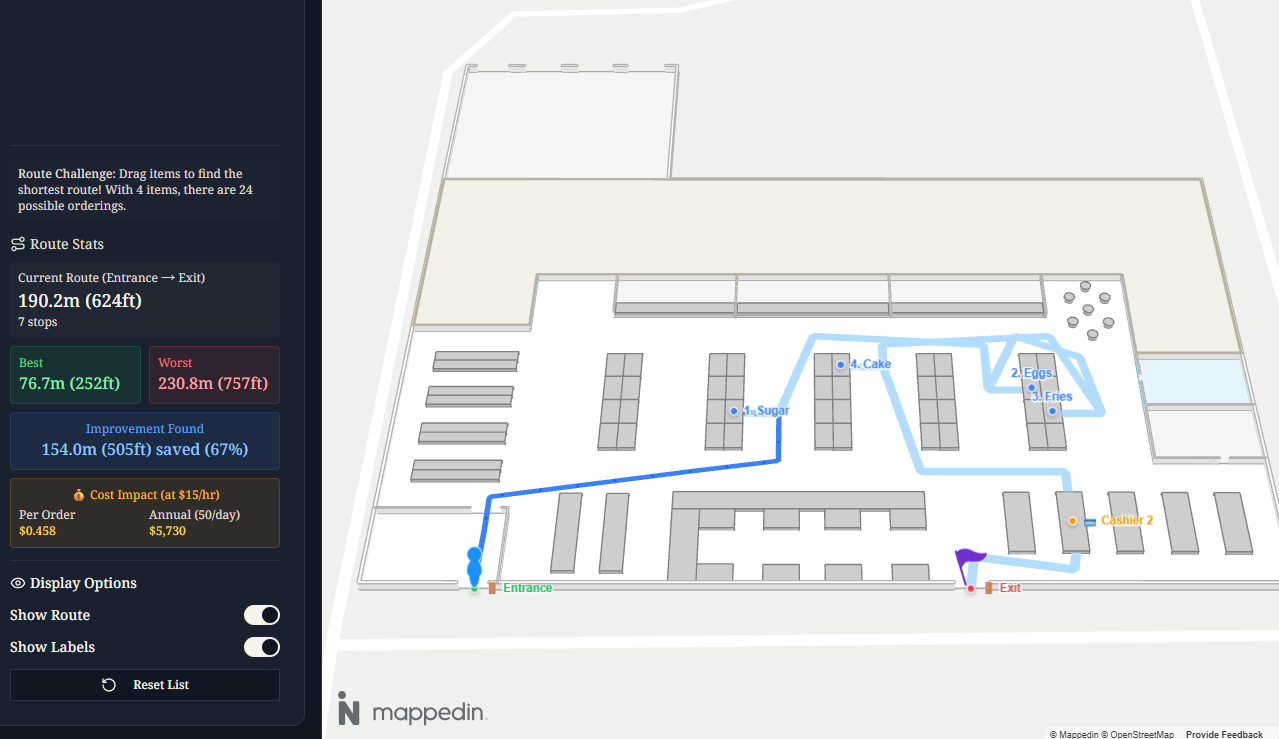
The Business Case
Consider a grocery store fulfillment operation:
- BOPIS (Buy Online, Pick In Store): Staff pick items for customer orders
- Dark stores: Dedicated fulfillment centers for delivery
- Warehouse picking: Order fulfillment in distribution centers
Let’s do the math. A picker handling 50 orders per shift who walks an extra 20m (66ft) per order due to poor routing:
- Daily waste: 1km (3,280ft) of unnecessary walking
- Time lost: ~12 minutes/day at average walking speed (1.4 m/s)
- Labor cost: ~$4/day at $20/hr
- Annual cost per picker: ~$1,000/year
- 1,000 pickers: $1,000,000/year
That’s just 20m of inefficiency per order. Real-world inefficiencies often exceed 50m (164ft) per pick run.
Route optimization isn’t about finding the shortest path between two points. It’s the Traveling Salesman Problem: given N items to collect, what order minimizes total distance?
Mappedin Setup
Mappedin provides indoor maps with searchable locations and multi-destination routing. The Mappedin SDK handles map rendering and navigation visualization.
import {
  MapView,
  useMapData,
  useMap,
  Navigation,
  Label,
} from "@mappedin/react-sdk";

const MAPPEDIN_OPTIONS = {
  key: "your-api-key",
  secret: "your-api-secret",
  mapId: "your-map-id",
};

function App() {
  const { isLoading, error, mapData } = useMapData(MAPPEDIN_OPTIONS);

  if (isLoading) return <div>Loading map...</div>;
  if (error) return <div>Error loading map</div>;

  return (
    <MapView mapData={mapData}>
      <MapContent />
    </MapView>
  );
}
Location Search
Mappedin maps contain typed entities: spaces (rooms, aisles), objects (products, fixtures), doors, and points of interest. For retail, products are typically object entities with attached location references for navigation.
function MapContent() {
  const { mapData } = useMap();
  const [searchEnabled, setSearchEnabled] = useState(false);

  // Enable search API on mount
  useEffect(() => {
    if (!mapData || searchEnabled) return;

    const enableSearch = async () => {
      await mapData.Search.enable();
      setSearchEnabled(true);
    };

    enableSearch();
  }, [mapData, searchEnabled]);

  // Search for a product location
  const searchLocation = async (name: string) => {
    const results = await mapData.Search.query(name);

    if (results.places?.length > 0) {
      const place = results.places[0];

      // Get the actual object from mapData
      const obj = mapData
        .getByType("object")
        .find((item) => item.id === place.item.id);

      // Objects have attached locations for routing
      if (obj?.locations?.length > 0) {
        return obj.locations[0];
      }
    }

    return null;
  };

  // ...
}
The key insight: Mappedin separates display entities (objects you see on the map) from navigation entities (locations the routing engine understands). Products are objects; their shelf positions are locations.
Multi-Destination Routing
Single A→B routing is straightforward. Multi-destination routing—entrance → item1 → item2 → … → checkout → exit—requires getDirectionsMultiDestination.
const calculateRoute = async (
  entrance: MappedinLocation,
  itemLocations: MappedinLocation[],
  checkout: MappedinLocation,
  exit: MappedinLocation
) => {
  const destinations = [...itemLocations, checkout, exit];

  const directions = await mapData.getDirectionsMultiDestination(
    entrance,
    destinations
  );

  // directions is an array of Directions objects
  // Each contains instructions with distance values
  let totalDistance = 0;

  directions.forEach((segment) => {
    segment.instructions.forEach((instruction) => {
      totalDistance += instruction.distance || 0;
    });
  });

  return { directions, totalDistance };
};
The API returns an array of Directions objects—one per leg of the journey. Each contains turn-by-turn instructions with distance measurements.
Rendering the Route
The Navigation component renders the calculated path on the map:
function RouteDisplay({ directions }) {
  return (
    <Navigation
      directions={directions}
      options={{
        pathOptions: {
          color: "#3b82f6",
          displayArrowsOnPath: true,
          animateArrowsOnPath: false,
          width: 0.5,
        },
      }}
    />
  );
}
Add labels to mark waypoints:
function WaypointLabels({ items, entrance, checkout }) {
  return (
    <>
      <Label
        target={entrance}
        text="🚪 Start"
        options={{
          rank: "always-visible",
          appearance: { color: "#22c55e" },
        }}
      />

      {items.map((item, index) => (
        <Label
          key={item.id}
          target={item.location}
          text={`${index + 1}. ${item.name}`}
          options={{
            rank: "always-visible",
            appearance: { color: "#3b82f6" },
          }}
        />
      ))}

      <Label
        target={checkout}
        text="💳 Checkout"
        options={{
          rank: "always-visible",
          appearance: { color: "#f59e0b" },
        }}
      />
    </>
  );
}
The rank: "always-visible" option ensures labels display regardless of zoom level—critical for operational interfaces.
Retail Applications
Pick-and-pack optimization: Generate pick lists ordered by optimal route through the warehouse. Integrate with WMS to batch orders by zone.
BOPIS efficiency: Staff app shows next item location with turn-by-turn directions. Track pick times per item for labor planning.
Customer wayfinding: Shopping list → optimized store route. Reduces time in store (good for customers) while increasing pick efficiency for staff-assisted shopping.
Planogram optimization: Analyze common basket combinations. Place frequently co-purchased items along efficient routes to reduce congestion.
Implementation Notes
Map accuracy matters: Mappedin routing uses the indoor map’s connection graph. Blocked aisles, one-way paths, and closed areas need map updates.
Location data quality: Product-to-location mapping must stay current. Integrate with inventory management to flag moved items.
Device deployment: Web apps work on shared tablets. Native apps enable barcode scanning and offline capability for dead zones.
Metrics to track:
- Distance per pick
- Time per pick
- Route deviation (planned vs actual)
- Order completion rate
Conclusion
Mappedin’s SDK handles the hard parts: indoor positioning, search, and multi-destination routing. The business logic—list management, optimization heuristics, operational integration—is your domain.
For a working demo, check out the grocery route optimizer built with the code patterns shown here.